
30 October 2009
NEC Eyeglasses Translate Foreign Languages
These glasses still sound a little like a concept to me, but several blogs are reporting their existence, so they're worth spending a little virtual ink on, so long as it's taken with a grain of salt. The glasses, designed by NEC, are the perfect international travel companion in that they take a foreign language, intepret it into your own language and then cast the intepretation onto your retina so that you're able to seamlessly speak with others (or at least understand what they're saying).

29 October 2009
Create a Stylish Club Poster

Step 1
Download this image www.sxc.hu and open it up in Photoshop. Duplicate the layer and go to Filter, Sharpen, Sharpen.
Step 2
28 October 2009
Easily Transform Your Photo into a Watercolour Painting in Photoshop
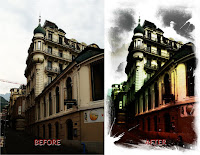
Editor's Pick in Photoshop Tutorials
A few-step technique to get a realistic drawing that even seems to have that odour of a paint. A great method to create your own gallery while improving your Photoshop skills.
Step 1
1. Load a photo of you choice into photoshop. You can use the above "before" image if you want to follow exactly what's in this tutorial.
Adding Texture to the Skin
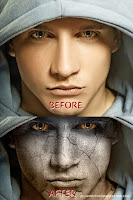
Editor's Pick in Photoshop Tutorials
Give a man's face a stone feel and look to manipulate the message. Great trick for propaganda and social advertising as well as provoking web design.
Firstly, start by finding a stock photo that you can add the texture to. For example, you can use this one or you can of course, go to Google Images and look up some picture you are interesting in. Also you need to find some appropriate stone texture. You can do it in the same way or feel free to use mine. Ok, now open up both of your photos in Photoshop, you can either keep it at it's current size of resize it down a little bit if you want. After that bring the texture picture to the canvas with the man's face:
15 July 2009
Design a Horror Style Text Effect with Dirt and Splatter Texture in Photoshop
 To complete this tutorial, you will need the following stocks:
 Font
Dirty Spray Brushset
Stroke and Splatter
Step 1
Create a new document sized 1200 * 800 px (in fact size doesn't really matter here, choose one you feel comfortable with), use White as background colour.
05 June 2009
Sewing a Fabric Badge in Photoshop
 Download Fabric Linen by Jaqx Textures here. Create a new document of size 500x708 pixels. Drag the texture downloaded into the working document. Name this layer as Fabric.
20 March 2009
Quick Logos with Live Trace in Adobe Illustrator
 Perhaps one of the most underutilized features in Illustrator is Live Trace, which can convert any photograph into vector art in just a few clicks. In this tutorial, we're going to use Live Trace to vectorize a photo for a logo design. Now, of course, all images are different, so depending on the final effect you want to achieve, you'll need to experiment with the settings that we'll be using here.
Subscribe to:
Posts (Atom)
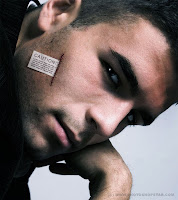
Creative Adding Label to the Skin
Ever read soft toys labels? This one is sure to attract your attention as it may contain some more valuable info than just washing directio...
-
 Ever read soft toys labels? This one is sure to attract your attention as it may contain some more valuable info than just washing directio...
 -
 Step 1: The key to this technique is to pick a starting image with lots of light/dark contrast and a good amount of dark shadows. Depending ...
 -
 Scroll down slowly and stop at each new frame. Julian Beever is an English artist who’s famous for his art on the pavement of England, Franc...